AI Dynamic Templates: What They Are and How They Work


Founder & CEO, Slashit App
You’ve written the perfect prompt before. The one that gets your LinkedIn post just right, or turns a rough cold email into something that actually gets a reply. Then next week you need it again, and you’re retyping the whole thing from memory, hoping you remember the wording that worked the first time.
That gap is exactly what AI dynamic templates close. They let you save a prompt once, mark the parts that change, and reuse it anywhere you type, from Gmail to Slack to your CRM. So instead of rewriting the same messages over and over, you build the structure once and let the AI handle the rest.
Below, you’ll find what AI dynamic templates actually are, how they work behind the scenes, the different types you’ll come across, and how to build your own so you stop explaining yourself to a chatbot every single day.
What Are AI Dynamic Templates?
AI dynamic templates are reusable content structures that combine a fixed format with variable placeholders, so artificial intelligence can generate personalized output every time you use them.
Instead of writing a full prompt or message from scratch, you set up the wording once, mark the parts that change like {topic} or {client name}, and let the AI fill in the rest based on new input.
A dynamic template works like a form with a brain attached. The form part stays the same: your tone, structure, and rules. The brain part, the AI model, reads whatever you type into the blanks and writes fresh content around it. That combination is what separates a dynamic template from a plain template sitting in a word processor.
The concept itself isn’t new. Marketing platforms have used dynamic templates for years to swap images, prices, and copy across thousands of banner ads.
What’s changed is the addition of generative AI, which means the variable part isn’t just swapped text anymore. It’s freshly written content, shaped by the same prompt every time but never identical twice.
Knowing the definition is one thing. Seeing how the mechanics actually fire off in the background is what makes the whole idea click.
How Do AI Dynamic Templates Work?
AI dynamic templates work in three steps: you trigger the template, fill in the variable fields, and the AI model generates new content using your saved prompt and those inputs. The entire process usually takes seconds, not minutes.
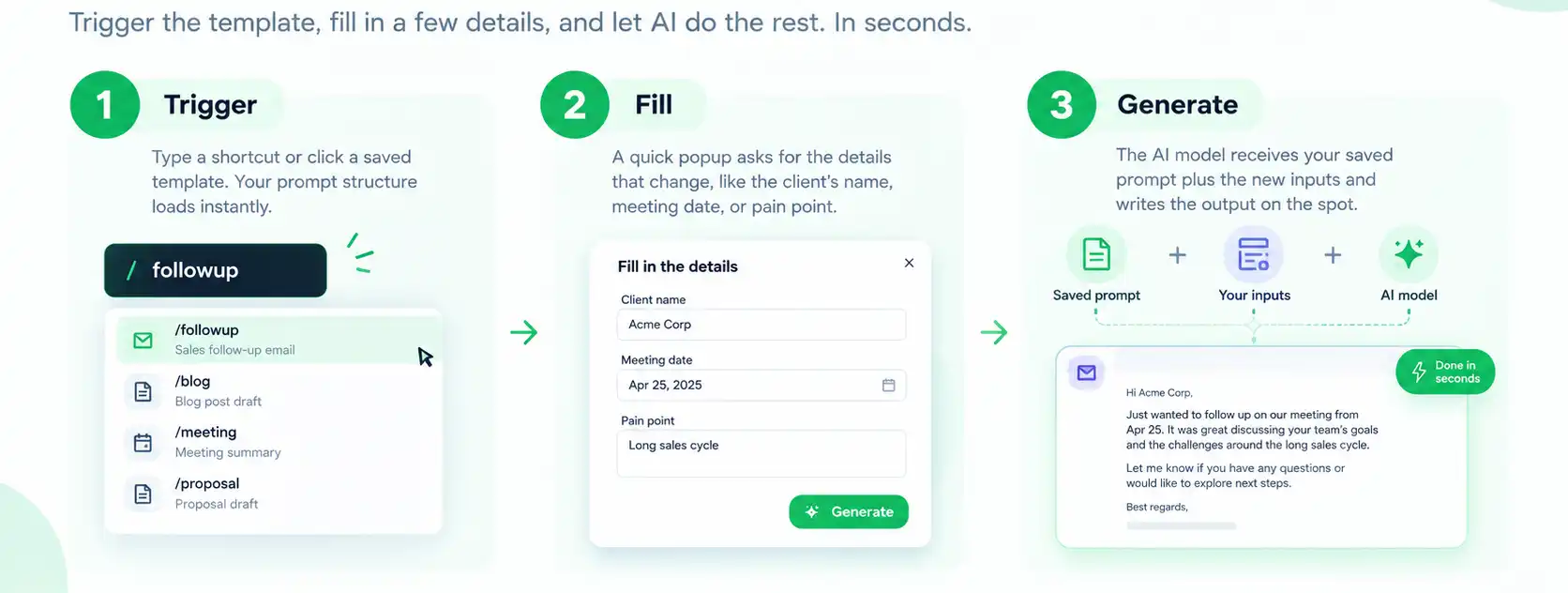
Say you built a template called /followup for sales emails. Here’s what happens behind the scenes each time you use it.
- Trigger: You type a shortcut or click a saved template, which loads your prompt structure instantly.
- Fill: A small popup asks for the details that change, like the client’s name, the meeting date, or the pain point they mentioned on the call.
- Generate: The AI model, whether that’s ChatGPT, Gemini, or another engine, receives your saved prompt plus the new inputs and writes the output on the spot.
The finished text lands wherever your cursor already is. No copying from a chatbot tab, no pasting into your email client, no losing your place. Furthermore, because the prompt itself stays fixed, the tone and structure stay consistent even though the topic changes every time.
Tools built specifically for this, like Slashit’s Dynamic Templates with AI, handle all three steps automatically, so you only touch the raw prompt once, during setup.
That consistency is really the whole point. You’re not asking the AI to guess what you want. You already told it, once, and now it just fills in the blanks.
Once you understand the mechanism, the next natural question is where these templates actually show up in daily work. The answer covers more ground than most people expect.
What Are the Different Types of AI Dynamic Templates?
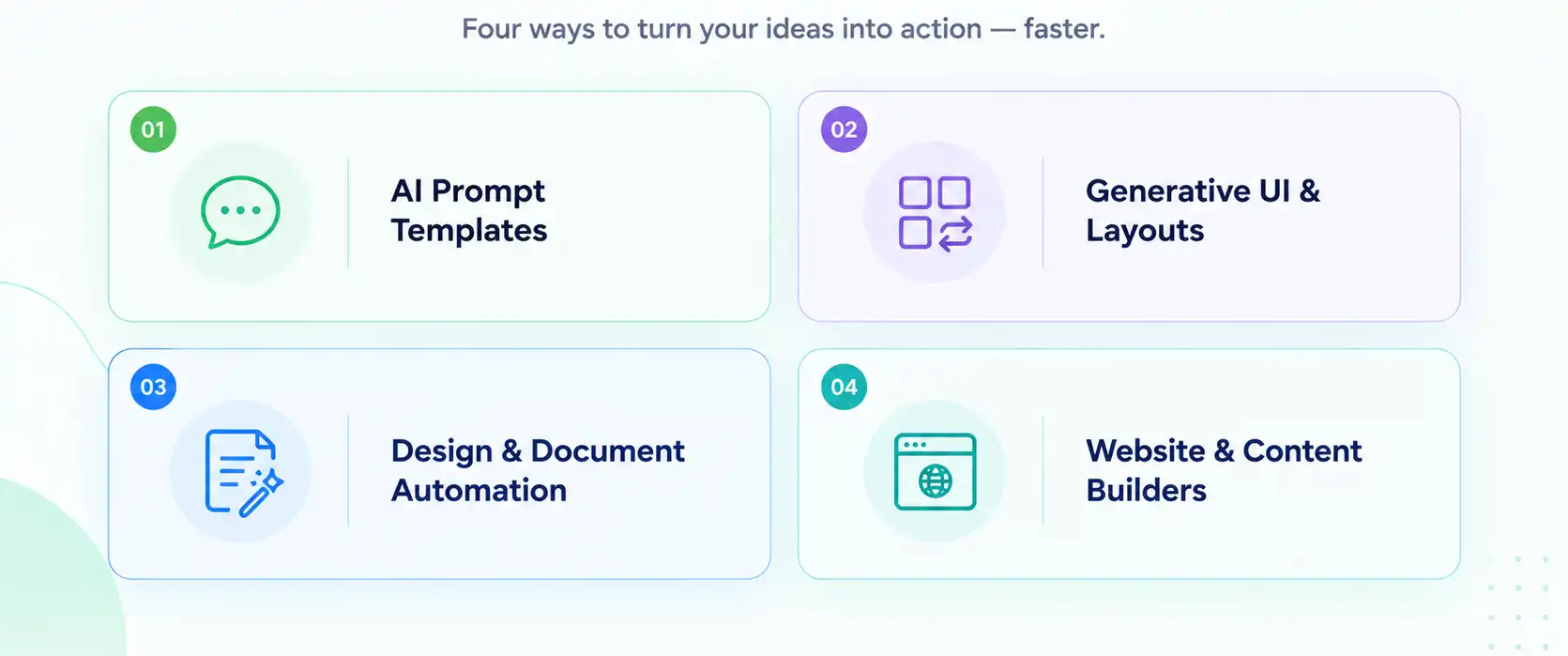
AI dynamic templates generally fall into four categories: prompt templates, generative UI layouts, design and document automation, and website or content builder templates. Each one applies the same core idea, a fixed structure plus AI-driven variables, to a different kind of output.
AI Prompt Templates
AI prompt templates are reusable text prompts with placeholders such as {topic} or {audience}, built for everyday writing tasks like emails, social posts, and customer replies. You write the prompt once, save it under a shortcut, and fill in only what changes each time you use it.
Most professionals run into this type first, mainly because it solves the most common daily headache: rewriting the same instructions into ChatGPT over and over.
A content marketer might build one prompt for LinkedIn posts, another for newsletter intros, and a third for cold outreach, each with its own set of placeholders. Slashit’s Dynamic Template feature works exactly this way, turning a saved prompt into something you trigger with a keystroke instead of a copy-paste routine.
Generative UI and Dynamic Layouts
Generative UI templates change the visual layout itself, not just the text, switching between formats like tables, charts, or decision trees depending on what data comes in.
Say a support tool detects a billing question. It might render a step-by-step decision tree. Ask it about an order status instead, and the same system renders a simple status card.
The AI decides the shape of the answer here, not just the words inside it. That distinction matters more in product interfaces than in day-to-day writing, but it’s part of the same family of technology.
Design and Document Automation
Design and document automation templates let you generate custom layouts for marketing emails, reports, or one-off documents just by describing what you need in plain language.
Field-mapping tools built for this purpose can pull structured data straight into a formatted document, cutting out the manual copy-paste work designers used to do by hand.
Website and Content Builder Templates
Website and content builder templates tailor an entire site’s text, colors, and images to match a specific brand or industry automatically. A handful of website builders now use this approach to generate a starting layout based on a business name or industry, then adjust the copy and color palette to fit.
Every one of these types follows the same logic: a fixed shell, a smart variable, and an AI model doing the filling in. What differs is the output, whether that’s a paragraph, a layout, or an entire page. Seeing how this compares to old-school static templates makes the upgrade a lot easier to picture.
How Are AI Dynamic Templates Different From Traditional Templates?
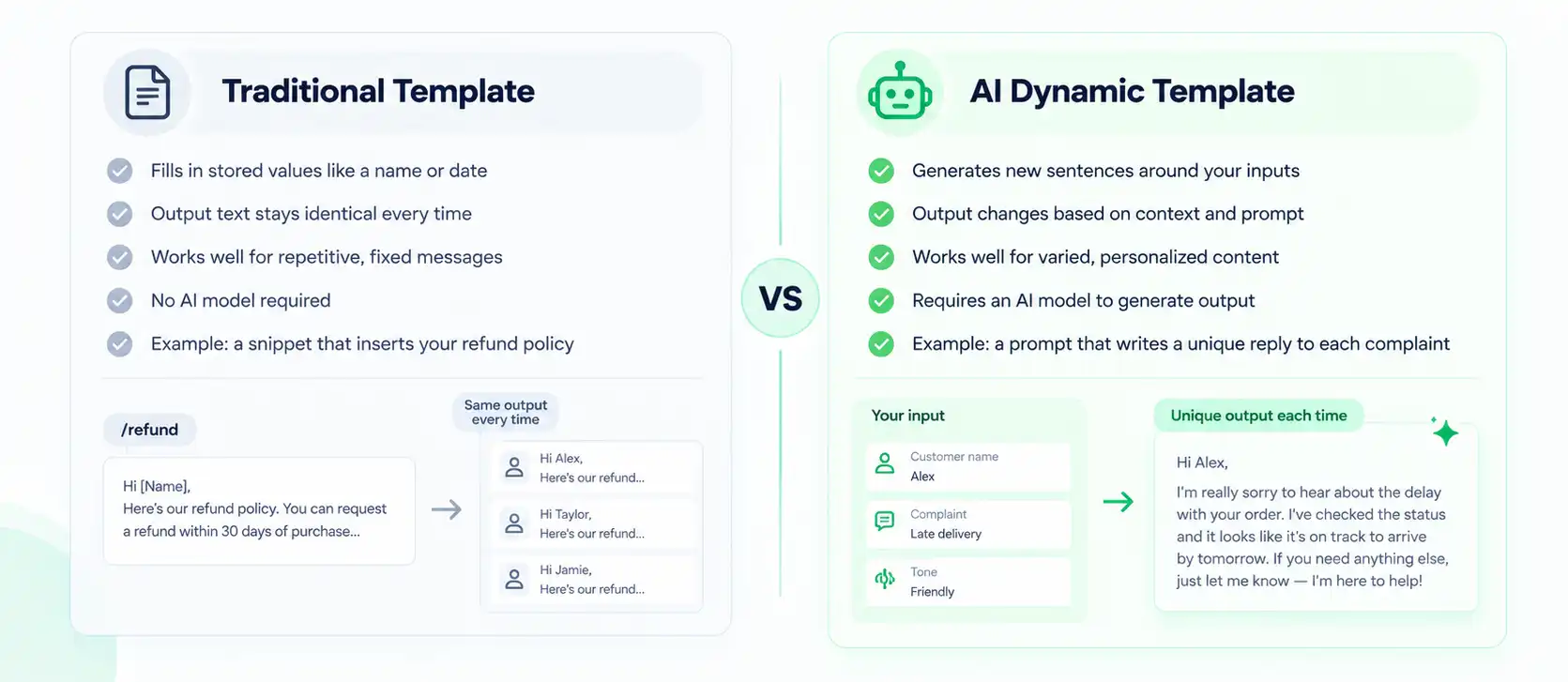
The core difference is that traditional templates repeat the same fixed wording every time, while AI dynamic templates generate new wording based on your prompt and inputs. One swaps in stored values. The other writes fresh content around them.
| Traditional Template | AI Dynamic Template |
|---|---|
| Fills in stored values like a name or date | Generates new sentences around your inputs |
| Output text stays identical every time | Output changes based on context and prompt |
| Works well for repetitive, fixed messages | Works well for varied, personalized content |
| No AI model required | Requires an AI model to generate output |
| Example: a snippet that inserts your refund policy | Example: a prompt that writes a unique reply to each complaint |
A basic snippet, like the ones in Slashit’s plain Snippet feature, is a traditional template. It inserts the same paragraph every time you trigger it, which is exactly what you want for a refund policy or a meeting link. An AI dynamic template, on the other hand, rewrites that paragraph based on the customer’s specific complaint, project, or tone.
Neither approach beats the other across the board. That said, once your message needs to sound personal rather than copy-pasted, the AI version earns its place in your workflow.
That distinction sets up the real question most people care about. What do you actually gain by switching to the AI version?
What Are the Key Benefits of AI Dynamic Templates?
AI dynamic templates save time, keep your voice consistent, and personalize content automatically, without asking you to write a new prompt for every situation. A few benefits stand out above the rest.
- Speed. A LinkedIn post that once took 8 to 12 minutes to draft, including the back-and-forth with ChatGPT, can drop to under 10 seconds once the prompt and placeholders are set up.
- Consistency. Your tone, structure, and brand voice stay identical across every output, even when five different people on a team are generating content from the same template.
- Personalization at scale. The same prompt adapts to dozens of names, topics, or situations without sounding like a form letter someone forgot to update.
- Less mental overhead. You stop trying to remember which exact wording worked best last time, because it’s already saved and ready to trigger.
Pair a solid template with a tool like Slashit’s Magical AI Rewrite, and you can also polish anything you’ve already written in the same keystroke, tightening tone right before it gets sent.
Numbers and benefits are convincing on paper, but they carry more weight once you see who’s actually using these templates and for what.
Who Uses AI Dynamic Templates, and How?
Content marketers, sales reps, founders, and support agents are the most common users of AI dynamic templates, and each group builds templates around the specific messages they write most often.
- Content marketers build templates for LinkedIn posts, newsletter intros, and blog outlines, with placeholders for topic and audience, turning a week’s worth of social content into a few minutes of typing. See how marketers use Slashit.
- Sales reps set up cold email templates with placeholders for prospect name, company, and pain point, so outreach reads personal instead of copy-pasted. See how sales teams use Slashit.
- Founders and managers save time on investor updates and weekly summaries, filling in metrics and wins instead of rewriting the same report structure every Monday morning. See how founders use Slashit.
- Support agents generate contextual replies based on a customer’s issue and history, replacing generic canned responses with something that reads like it was actually written for that person. See how support teams use Slashit.
Every one of these examples follows the same rhythm: build once, trigger daily. Turning that idea into a working template of your own takes five fairly simple steps.
How Do You Create Your Own AI Dynamic Template?
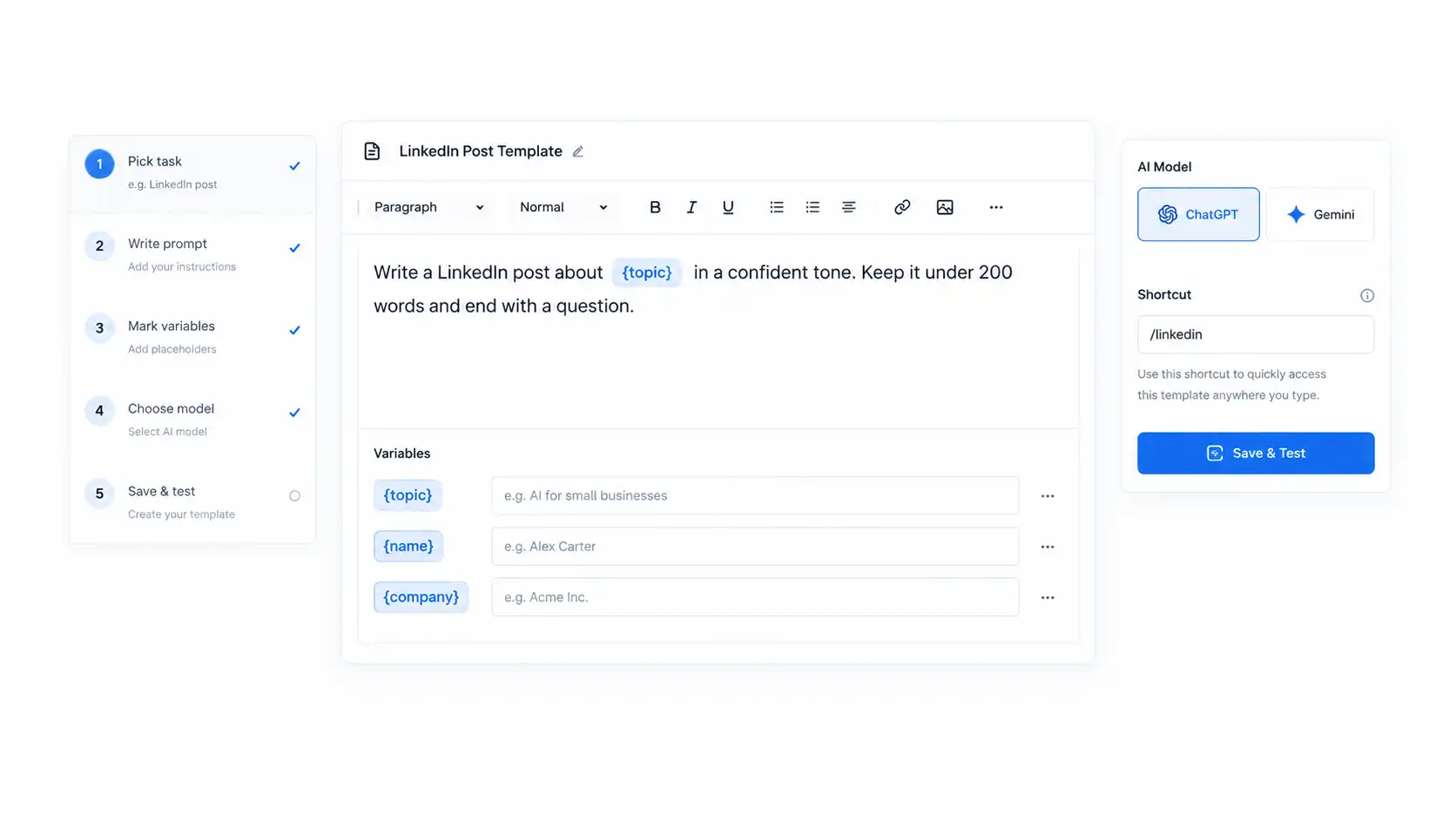
Building an AI dynamic template takes five steps: pick a repetitive task, write the prompt, mark the variables, choose an AI model, and save it as a trigger you can use anywhere you type.
- Pick a repetitive task. Look for anything you write more than twice a week, whether that’s LinkedIn posts, cold emails, meeting summaries, or support replies.
- Write the prompt once, properly. Include your tone, length, and structure rules. For example: “Write a LinkedIn post about {topic} in a confident tone. Keep it under 200 words and end with a question.”
- Mark what changes. Wrap the variable parts in placeholders like {topic}, {name}, or {company} so the system knows what to ask you for later.
- Choose your AI model. Different prompts perform better on different engines, so pick whichever one, ChatGPT, Gemini, or another, gives you the output you actually want.
- Save it under a shortcut and test it. Trigger the template, fill in the blanks, and check whether the output matches what you had in mind. Adjust the wording if it falls short.
If you’d rather start from something already built instead of a blank page, browse a library of ready-made examples and adjust them to fit your own tone.
That five-step process works with almost any tool that supports AI prompts. That said, having it built directly into the app you already type in removes a few extra clicks worth mentioning.
How Does Slashit Make AI Dynamic Templates Effortless?
Slashit turns the entire process above into a single keystroke, letting you trigger a saved AI prompt, fill in one small popup, and get finished content inside Gmail, Slack, Notion, or any other app without switching tabs.
Take the LinkedIn post example from earlier. Without a saved template, drafting one from scratch usually eats 8 to 12 minutes: opening ChatGPT, retyping your tone rules, plugging in the topic, generating, then copying the result back into LinkedIn.
With a Dynamic Template with AI set up as /linkedinpost, you type the shortcut, enter the topic in a small popup, and the finished post appears inside the LinkedIn composer in under 10 seconds.
Real users report similar results. One B2B content marketer using Slashit went from spending 10 to 15 minutes per post, half of it spent re-prompting ChatGPT, to posting four times a week instead of once, simply because the friction disappeared.
A sales development lead who built a cold email template with placeholders for prospect name and pain point saw their reply rate double within six weeks, mostly because the outreach stopped sounding templated in the first place.
None of this requires connecting a separate integration for every app you use. Furthermore, because Slashit runs at the operating system level rather than inside a browser extension, the same saved template works whether you’re typing in Gmail, your CRM, or a quick Slack message. Curious how other roles are using it? Browse real customer stories to see the full range.
Building your own library eventually turns into managing a growing set of templates. A few best practices keep that library sharp instead of letting it turn into digital clutter.
What Are the Best Practices for Building Effective AI Dynamic Templates?
The best AI dynamic templates use clear placeholders, tested prompts, and a narrow focus, one job per template instead of one template trying to do everything at once.
- Keep each template focused on a single job. A template trying to write emails, posts, and summaries all at once usually ends up doing none of them well.
- Test the prompt before you rely on it. Run it with three or four different inputs and check whether the tone holds up across all of them.
- Name your placeholders clearly. {client_name} is easier to remember under pressure than {x1}, especially when you’re building your fifth template of the day.
- Review and refine every few weeks. Wording that worked well last quarter might sound stale now, so revisit your top templates the same way you’d revisit any other piece of content.
- Share what works. If a template consistently produces strong output, share it with your team instead of letting a good prompt live in one person’s head.
Curious which other tools pair well with this kind of workflow? This roundup of the best AI writing tools is worth a look for anything a dynamic template can’t cover on its own.
With the practical side covered, a few quick questions tend to come up whenever this topic gets discussed.
Frequently Asked Questions About AI Dynamic Templates
Are AI dynamic templates the same as regular templates?
No. A regular template repeats the same fixed wording every time, while an AI dynamic template generates new wording around your inputs using an AI model. Both rely on placeholders, but only one of them actually writes fresh content.
Do I need coding skills to build one?
No coding is required. Most tools, including Slashit, let you write the prompt in plain language, mark the variable parts, and save it as a shortcut without touching a line of code.
Which AI models work with dynamic templates?
Most dynamic template tools support multiple models, including ChatGPT and Gemini, and let you pick a different model for each template. That flexibility matters because some prompts perform better on one model than another.
Can I use AI dynamic templates for free?
Many tools offer a free tier that covers basic templates and limited AI usage, with paid plans adding higher usage limits and team sharing. Check the current pricing page of whichever tool you’re considering to confirm the exact limits.
How many templates should I build to start?
Most people start seeing real value with just three to five templates covering their most repeated tasks, then expand from there. Building twenty templates on day one usually means half of them go untouched.
Can a whole team share the same AI dynamic template?
Yes, on most platforms you can share a template so every teammate runs the identical prompt with their own inputs. That keeps tone and structure consistent across an entire team’s outreach or content.
Key Takeaways
AI dynamic templates save the prompts you already know work and turn them into one-click shortcuts you can use anywhere you type. Once you build a small library covering your most repeated writing tasks, the daily grind of re-explaining yourself to ChatGPT mostly disappears.
Start with one template, whichever task eats the most of your week, and build outward from there. Speed comes second. Consistency comes first, and once that’s in place, everything else gets easier.
If you’d rather skip the manual setup entirely, Slashit’s free plan lets you build and test AI dynamic templates today, right inside Gmail, Slack, Notion, or wherever else you already write.
// more articles
 Template
 Content Marketing Brief Template: The Complete Guide
A content marketing brief template that keeps writers aligned, cuts revisions, and speeds up content production, with a free copy-ready template.
 Template
 Corporate Trainer Session Outline Template: With Examples
A ready corporate trainer session outline template with a timed agenda, clear objectives, and a materials checklist you can copy today.
 Alternatives
 Best Productivity Tools for Managers in 2026 (Tested and Compared)
A clear, no-fluff guide to the best productivity tools for managers in 2026, from task apps to tools that cut daily writing time in half.

// blog updates
