Freelance Writer Proposal Templates: How Do They Save You Hours Every Week?


Founder & CEO, Slashit App
You know the feeling. A new lead lands in your inbox, and before you can even think about the job, you’re staring at a blank document wondering how to start the proposal. Ten minutes turns into forty. Forty turns into “I’ll finish this tomorrow.” By the time you send it, another writer already landed the gig.
That blank page problem is the real time sink, not the writing itself. A solid freelance proposal template fixes it. You stop rebuilding the same structure from scratch every time you pitch, and you start sending proposals in the time it used to take you to just open a blank doc and stare at it.
This guide walks through why templates work, what to put in yours, how much time they actually save, and how to personalize fast without turning into a form letter freelancer nobody wants to hire. By the end, you’ll have a clear structure to build from and a few habits that keep it from going stale.
Why Does a Proposal Template Save Time When the Blank Page Is the Real Problem?
A freelance writer proposal template saves time because it handles the structure for you, so your brain can focus on the one thing that actually matters: convincing this specific client to hire you.
Here’s what typically eats your time when you write a proposal from zero:
- Deciding what sections to include and in what order
- Formatting headers, spacing, and layout so it looks professional
- Wording your rates and payment terms the same way you did last time, except you forgot exactly how you phrased it
- Digging through old emails to find that one testimonial you like to quote
- Second guessing your call to action right at the point where you’re ready to hit send
None of that is client specific work. It’s repetitive setup, and it’s exactly what a template eliminates. Once your structure and boilerplate language are locked in, every new proposal becomes a fill in the blanks exercise instead of a from scratch writing project. It’s the same reason text expander tools have become a staple for freelancers: the repetitive parts of the job shouldn’t need to be rebuilt every single time.
That’s the core mechanism behind why templates work at all. But a template only saves time if it’s actually built with the right pieces inside it, which is where a lot of freelancers go wrong.
What Sections Should Every Freelance Writing Proposal Template Include?
A proposal template only saves you time if it’s built right, and that means six sections working together instead of a vague pitch with your rate slapped on the bottom.
Here’s the structure that shows up across nearly every high-converting freelance writing proposal example:
- Executive summary. A short hook that names the client’s problem and previews how your writing solves it. Two or three sentences, no more. This is the part clients actually read first, so it needs to feel written for them, not copied from your last five pitches.
- Scope of work and deliverables. Exact word counts, article types like blog posts, case studies, or white papers, and how many revision rounds are included. Vague scope is one of the most common reasons freelance writing projects turn into scope creep later.
- Project timeline. Real dates for drafts and final delivery, not vague windows like “a couple weeks.” Clients want to know when they’ll see something, and a specific date builds more trust than a general estimate.
- Pricing and payment terms. Your rate, any bundled pricing for multiple pieces, milestone payments if the project is large, and which payment methods you accept. Clear terms here prevent awkward conversations later.
- Social proof and portfolio. Links to published clips, a relevant case study, or a client quote that fits the specific project type. A testimonial about blog writing doesn’t land the same way for a technical whitepaper client.
- Call to action. A clear, specific next step, like “reply to confirm and I’ll send the contract today.” Proposals without a direct CTA tend to stall, not because the client said no, but because nobody told them what to do next.
Each section does one job, and skipping one usually costs you more than the time you saved. Miss the timeline, and clients start wondering if you’ll actually deliver on schedule. Miss the CTA, and even a strong proposal can sit unanswered because the client isn’t sure what happens next.
Once those six blocks are built once, you’re not writing a proposal anymore. You’re assembling one. And that shift is exactly where the time savings start to show up in real numbers.
How Much Time Can a Template Actually Save You?
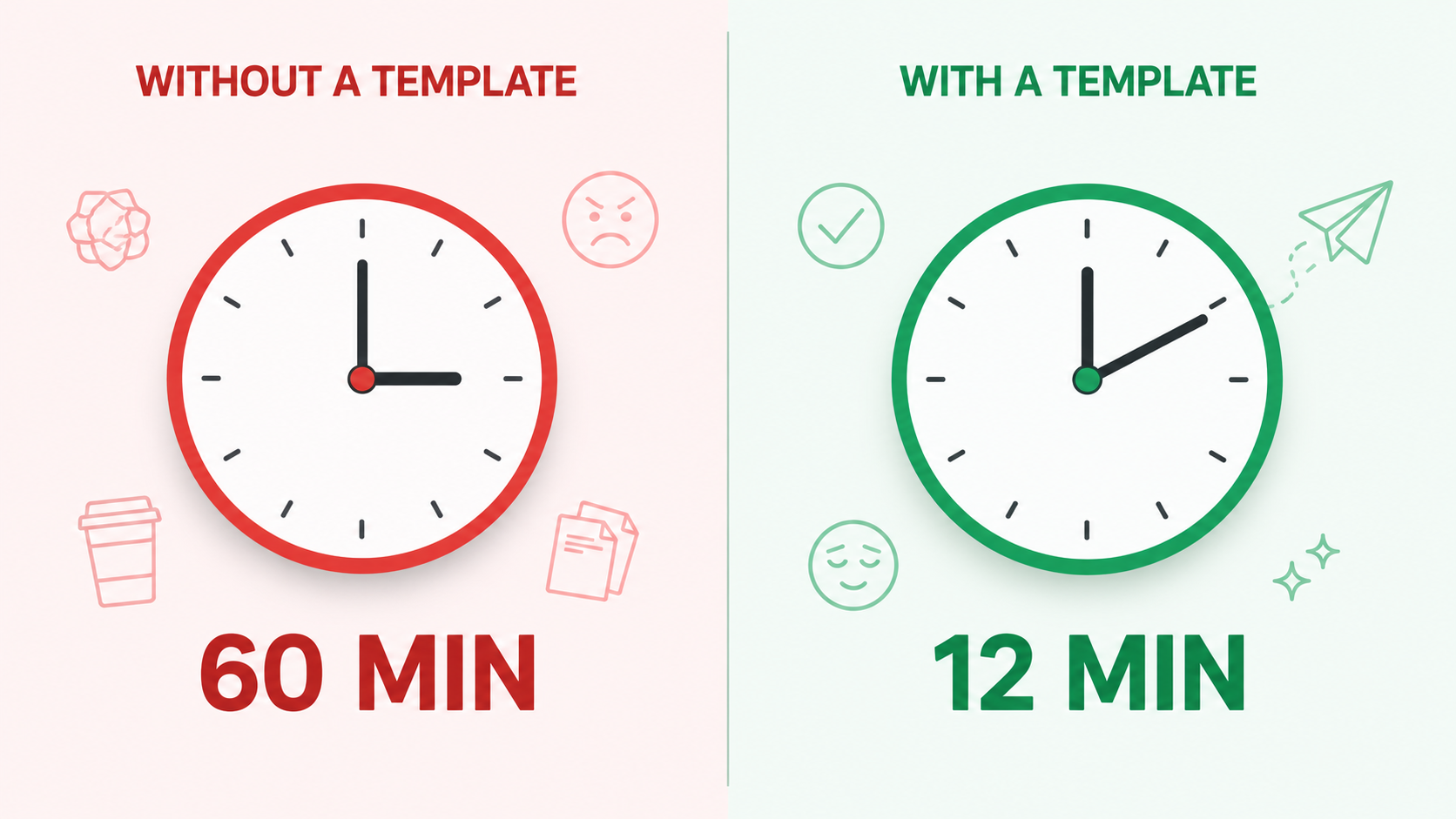
A template can cut proposal writing time from over an hour down to fifteen minutes or less, because you’re editing existing content instead of generating it fresh every time.
Here’s a rough breakdown based on how most freelance writers actually work when pitching a mid sized content project:
| Task | Without a template | With a template |
|---|---|---|
| Structuring the proposal | 15-20 min | 0 min |
| Writing the pitch and summary | 20-30 min | 5-10 min |
| Formatting | 10 min | 1-2 min |
| Pricing and terms | 10 min | 2 min |
| Total | 55-70 min | 10-15 min |
Multiply that by how many proposals you send in a month. If you’re pitching five clients a week, a template can save you four to five hours monthly. That’s time you could spend on billable work, client research, or honestly just not working late to catch up on pitches you put off.
Speed isn’t just a personal convenience either. Proposal software company Proposify has found that pitches sent within a day of the initial conversation close noticeably more often than ones that sit for five or more days, and proposals that lay out more than one pricing option close over a third more often than single-price ones. A template is what makes same-day sending realistic when you’re juggling multiple leads at once.
There’s a second, less obvious benefit too. When a proposal takes an hour to write, you naturally send fewer of them. You get selective about which leads are worth the effort, and you probably skip some decent opportunities because the writing overhead feels too high. Cut that overhead down, and you can afford to pitch more leads, which usually means landing more work overall.
That math only holds up, though, if your template is genuinely reusable without feeling recycled every time a client reads it. That’s the next piece to get right.
How Do You Build a Reusable Template Without Sounding Like a Form Letter?
The trick to a reusable proposal template is building it in modular blocks, so you can swap out client specific details without rewriting the whole thing.
Here’s how to structure it so it stays flexible instead of rigid:
- Write your boilerplate sections once. Your bio, your general process, your standard terms and payment methods. These rarely change between clients, so there’s no reason to rewrite them every time.
- Leave clear placeholder fields for the parts that always change, like the client’s name, their specific pain point, and the exact project scope. Mark these clearly so you never forget to fill one in.
- Keep two or three versions of your executive summary opener, so you’re not pasting the exact same sentence into every industry you pitch. A version for content marketing clients and a separate version for technical clients go a long way.
- Store your best testimonials by category, grouped by content writing, copywriting, or technical writing, so you grab the most relevant one fast instead of hunting through old emails right when you’re trying to send a proposal quickly.
- Build a short and a long version. Some clients want a quick, casual pitch. Others expect a formal, detailed proposal. Having both ready means you’re not adapting length under pressure.
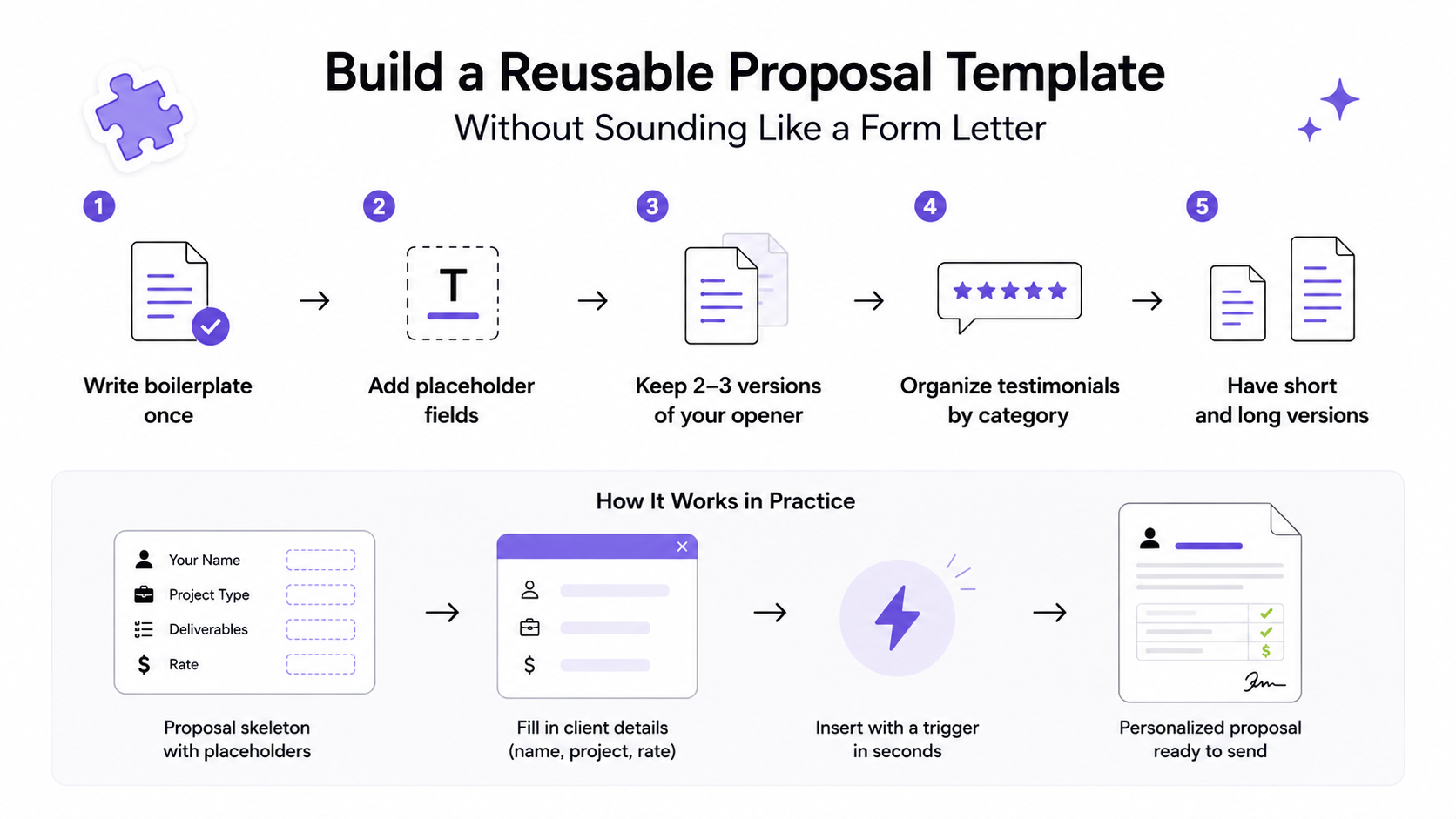
The goal isn’t to send the same document to everyone. It’s to never rebuild the parts that don’t need rebuilding, so your energy goes toward the ten or fifteen percent of the proposal that’s actually specific to this client and this project.
Here’s what that looks like in practice. Picture a proposal skeleton where your name, project type, deliverables, and rate are all live placeholder fields instead of hard-coded text. You type a short trigger word, a small popup asks for the client’s name, project type, and rate, and the finished proposal drops into your draft in seconds, already sounding like it was written for that one client. That’s the difference between a “template” that’s really just an old document you keep overwriting, and a true Dynamic Template that rebuilds itself around whatever you type into it.
Building the template is only half the job, though. Filling in the client specific parts fast is where most freelancers still lose time, and that’s worth solving separately.
How Do You Personalize Each Proposal in Minutes, Not Hours?
You personalize a proposal fast by changing only the details that need to change: the client’s name, their specific problem, and one or two lines that show you actually read their brief.
A few habits make this quick and consistent:
- Reference something specific from their brief, job post, or website in your executive summary. One sentence is enough to signal you’re not copy pasting a generic pitch.
- Adjust your scope section to match their exact deliverables instead of leaving generic placeholder language sitting in there unchanged.
- Swap your CTA slightly depending on how the client’s initial outreach felt. Formal clients get a formal next step. Casual clients get something more relaxed.
- Check your numbers every time. Word counts, deadlines, and pricing should reflect this specific project, not whatever numbers were sitting in the template from the last pitch.
This is also where a text expander or dynamic template tool earns its keep. A tool like Slashit lets you build your proposal skeleton once as a snippet, complete with fillable fields for the client’s name, project scope, and rate, then trigger the whole thing with a short code and tab through the blanks instead of retyping the structure every single time. It works directly inside Gmail, Notion, or whatever you’re drafting proposals in, without needing any special integration set up first.
Say a client’s brief reads a little more formal than your default opener. Instead of rewriting the whole paragraph by hand, you can highlight it and run it through an AI rewrite hotkey to shift the tone up or down, right inside the document you’re already drafting in. No tab switching to a separate AI chat window, no copy-pasting back and forth. You keep the structure, the tone adjusts to the client.
And when it’s time to drop in that one testimonial that fits a technical writing pitch, you don’t have to dig through six months of old emails to find it. Keep your best quotes and portfolio links in your clipboard history so the last hundred things you’ve copied, testimonials included, are one hotkey away.
You still write the personal parts yourself. You just stop rebuilding the scaffolding around them. Whatever method you use, the point stays the same: fast doesn’t have to mean generic, and generic is the only version of “fast” that actually costs you the job in the end.
Where Can You Find or Build Your First Proposal Template?
You can start with a pre built template from a proposal tool, or build your own in a plain document, and either option works fine as long as it covers the six core sections.
If you’d rather not build from scratch, a few solid starting points:
- Canva has customizable, visually polished proposal layouts if you want something that looks designed rather than plain.
- Better Proposals offers eSignature ready templates built specifically with freelancers in mind, useful if you want the client to sign right inside the document.
- Reedsy has a practical, writer-specific proposal template along with a breakdown of why each section matters, which is worth reading even if you end up building your own.
If you’d rather build your own, a simple Google Doc or Notion page works perfectly well. The format matters far less than the structure underneath it. And if you’re already looking at ways to tighten up your workflow beyond just proposals, it’s worth browsing a round-up of productivity tools built for freelancers and agencies to see what else is worth adding to your stack.
What matters is that you only build the structure once, and every proposal after that is a variation instead of a new document. Once you’ve got a template you trust, the real work shifts from building it to maintaining it. That’s where most freelancers eventually lose the time savings they started with.
What Mistakes Cancel Out the Time You Saved?
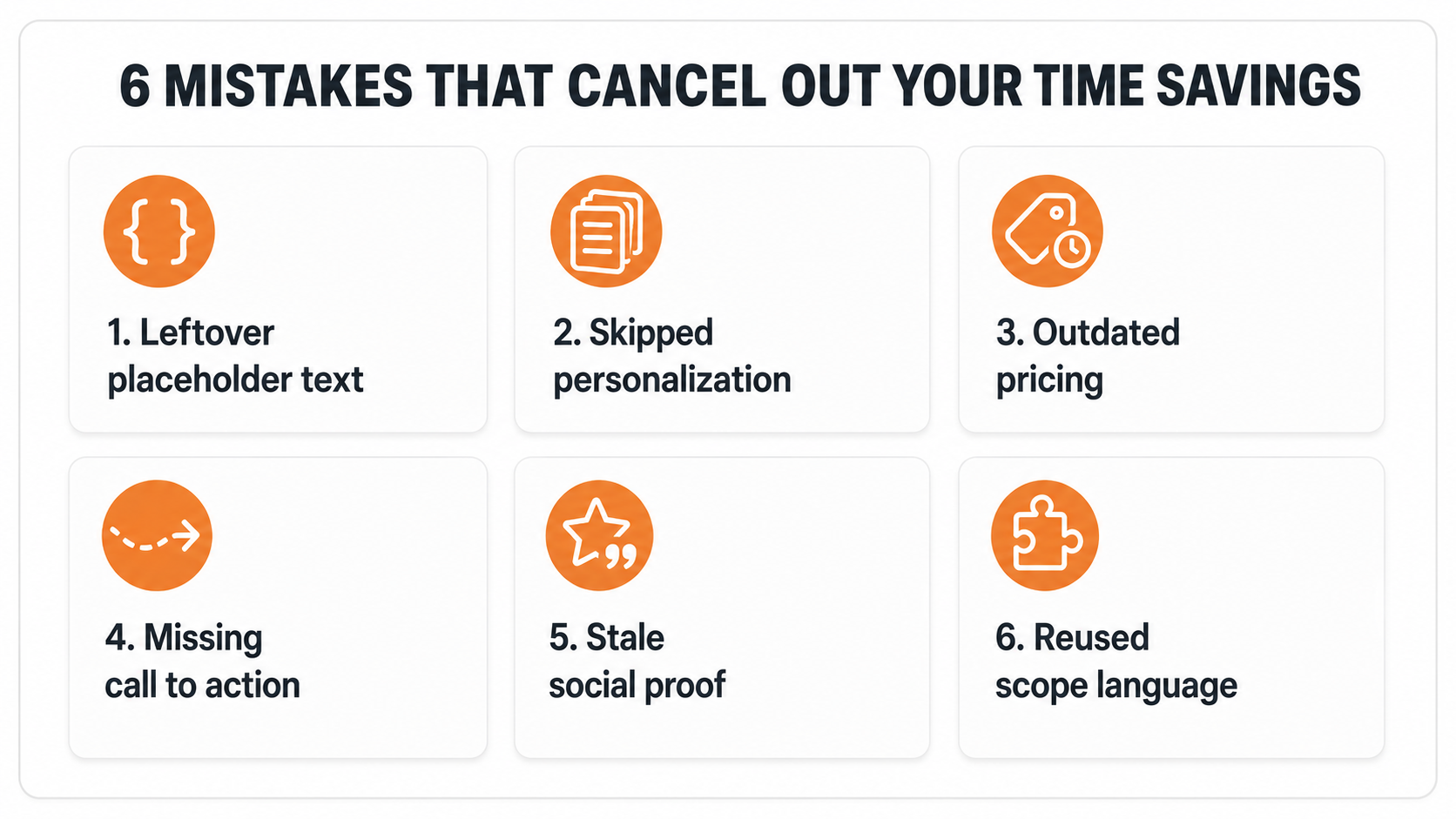
The most common mistake that kills a template’s time savings is over templating: sending the same generic pitch to every client without adjusting the parts that actually need to change.
Watch for these specific traps:
- Leaving placeholder text in by accident. Nothing kills trust faster than a client seeing “Client Name” still sitting in the greeting.
- Skipping personalization entirely. A template should speed up customization, not replace it. If two proposals in a row read identically, that’s a warning sign.
- Forgetting to update pricing after you raise your rates, so you’re quoting last quarter’s numbers to a brand new client.
- Dropping the CTA because it feels repetitive to write every time, even though it’s the line that actually moves the deal forward toward a yes.
- Never updating your social proof, so you’re linking the same two testimonials a year after finishing better, more relevant projects.
- Reusing scope language that doesn’t fit. A template built for blog posts doesn’t automatically work for a whitepaper or a longer content series without adjustment.
A good template is a living document, not a set it and forget it file. Revisit it every few months. Update your proof points, check that your rates and terms still match what you’re actually charging, and reread your executive summary opener to make sure it still sounds like you.
Get that maintenance right, and the time you save on structure goes straight back into winning more work instead of quietly undoing itself with a sloppy, obviously recycled pitch.
Does a Better Template Actually Improve Your Win Rate?
A well built template can improve your win rate, mainly because it guarantees consistency, not because clients are impressed by formatting.
Here’s why consistency matters more than most freelancers expect. When every proposal includes the same six core sections, you stop accidentally leaving out pricing details or forgetting a CTA on days when you’re rushed or tired. Clients respond to clarity, and a template makes clarity the default instead of something you have to remember to add every time.
The numbers back this up at a broader level too. Proposify’s research puts the average proposal close rate at 43%, meaning more than half of every proposal sent ends up going nowhere, and the gap between a low win rate and a high one usually comes down to structure and specificity rather than talent or price. That’s the exact gap a well maintained template is built to close.
That said, a template alone won’t fix a weak pitch. If your executive summary doesn’t actually address the client’s problem, no amount of formatting saves it. Track your own numbers for a month or two. Note how many proposals you send, how many get replies, and how many convert into paid work. If your reply rate goes up after switching to a structured template, that’s a strong signal the structure itself was part of what was missing before.
Win rate improvements aside, the time savings alone are usually worth the setup. But it’s worth knowing that a good template pulls double duty, saving your time and quietly making your pitches more consistent at the same time.
FAQ: Freelance Writer Proposal Templates
How do I write a freelance writing proposal faster without it looking rushed?
Build your boilerplate sections once, then spend your saved time on the parts that matter most: the executive summary and your reference to the client’s specific problem. Speed and quality aren’t opposites here. A template just moves your effort to where it counts.
What should a freelance writer proposal checklist include?
At minimum: executive summary, scope and deliverables, timeline, pricing, social proof, and a clear call to action. If any of those six are missing, your proposal is likely losing you jobs regardless of how well the writing itself reads.
Should I use different templates for different types of writing clients?
Yes, generally. A blog content client and a technical whitepaper client care about different things. Keep one core structure, but build two or three versions of your scope and social proof sections tailored to each niche you regularly pitch.
Is a proposal template worth it if I only send a few proposals a month?
Even at low volume, a template still saves setup time and keeps your pitches consistent. The time savings scale with volume, but the consistency benefit applies no matter how many proposals you’re sending in a given month.
Can I automate parts of my proposal template beyond just copy pasting?
Yes. Text expander tools let you trigger your entire proposal structure with a short code and fill in client specific fields as you go, which is faster than copying an old document and editing it by hand every time.
How often should I update my proposal template?
Every few months at minimum, or any time your rates, portfolio, or services change. An outdated template quoting old prices or linking dead portfolio links can undo the time you saved building it in the first place.
Final Thoughts: Build the Template Once, Reuse the Time Forever
A freelance writer proposal template won’t write your pitch for you, but it will stop you from rebuilding the same structure every single time you want to land a client. Build the six core sections once, personalize the parts that actually need it, and keep the whole thing updated as your rates and portfolio grow.
The freelancers who send proposals fastest aren’t necessarily better writers. They’ve just stopped spending forty minutes rebuilding a structure they’ve already written a hundred times. That’s the whole trade: less time on scaffolding, more time on the ten percent of the pitch that actually wins the job.
If you’re sending proposals often enough that the retyping is starting to add up, tools like Slashit can help you turn your proposal skeleton into a reusable snippet you fill in and send in minutes.
// more articles
 Productivity
 10 Best Grammarly Alternatives in 2026: Free and Paid
Comparing the best Grammarly alternatives for 2026 by price, AI customization, and use case, so you can find the right fit fast and skip the guesswork.
 Productivity
 Text Expander for Founders: Save Hours Every Week
A text expander for founders turns investor updates, cold outreach, and hiring replies into one hotkey. Compare tools, get templates, and set up in minutes.
 Productivity
 Text Expander for Managers: Stop Retyping the Same Messages
A text expander for managers turns repeated messages into instant shortcuts. See how tools like Slashit save managers hours every week.

// blog updates
